Help / Getting started
Getting started
From an empty browser tab to your first fight. Nothing to install and nothing to pay.
What you need
Vyrnfall runs in a web browser. It also runs in a phone or tablet browser with touch controls, though it is most comfortable with a mouse and keyboard. There is no app to install. You need:
- A compatible browser with WebGL enabled. Current Chrome, Edge, Firefox and Safari have it switched on unless it has been turned off.
- An internet connection. The first visit downloads the game files, which takes a minute or two; later visits start much faster.
- A username and a password that you choose. There is no email address, no download and no payment.
Open app.vyrnfall.net or press Play Vyrnfall at the top of any page on this site.
Create your character
Characters are created in the game, not on this website. When the game has loaded you see the title screen with two buttons.
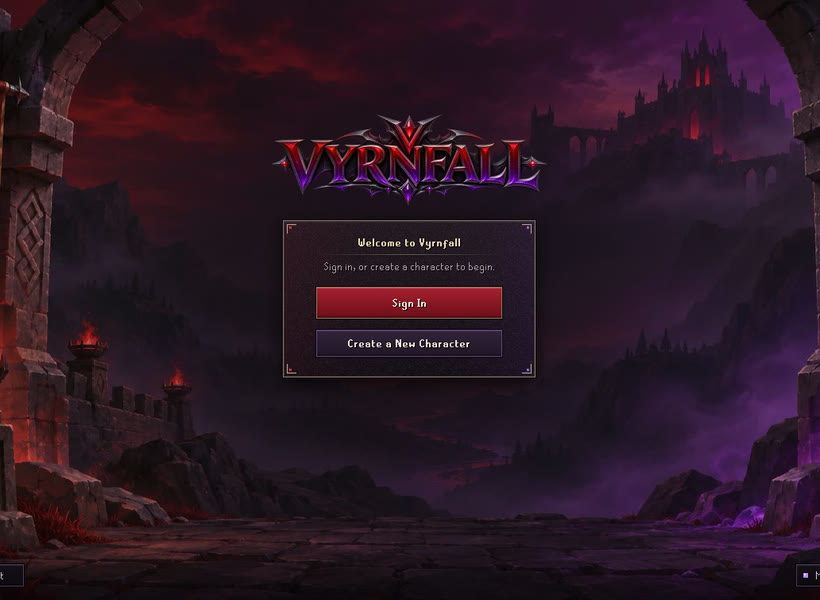
- Press Create a New Character.
- Type the username you want. It can be up to 12 characters: letters, numbers and spaces. This is the name you log in with from now on.
- Press Tab or click the Password box and type a password of 8 to 20 characters. Pick one you do not use anywhere else.
- Press Create Character or the Enter key.
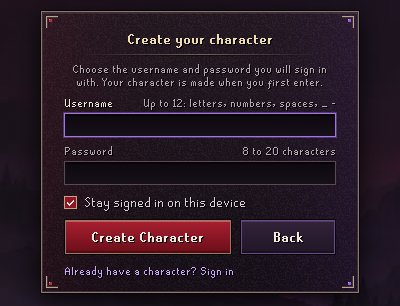
If nobody has that username, the character is created and you are in the game. If the name is taken, the form says so above the boxes: type a different name and press Create Character again.
Choose how you look
The first thing a new character sees is the Character Creator.
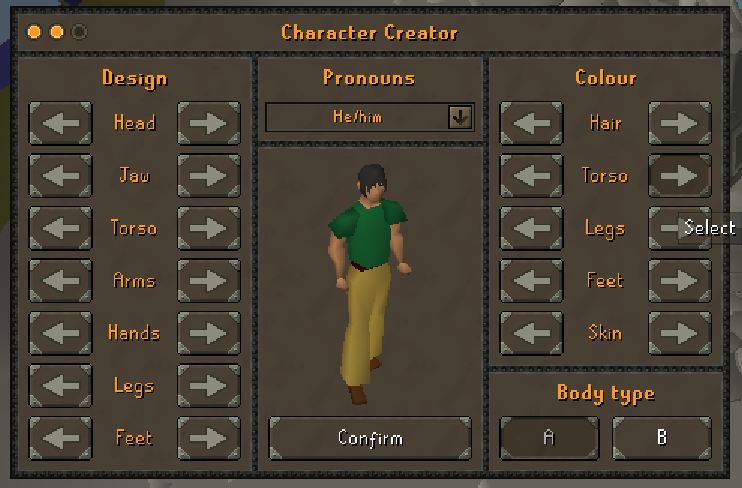
- Design (left): the arrows change the shape of your head, jaw, torso, arms, hands, legs and feet.
- Colour (right): the arrows change the colour of your hair, torso, legs, feet and skin.
- Body type: A or B.
- Pronouns: the drop-down above your character.
Press Confirm when you are happy. This is only your starting look; armour and clothes you wear later cover most of it.
Choose a mode (or skip it)
Next comes Ironman Setup. Most players should leave this on None and close the window with the X in its corner.
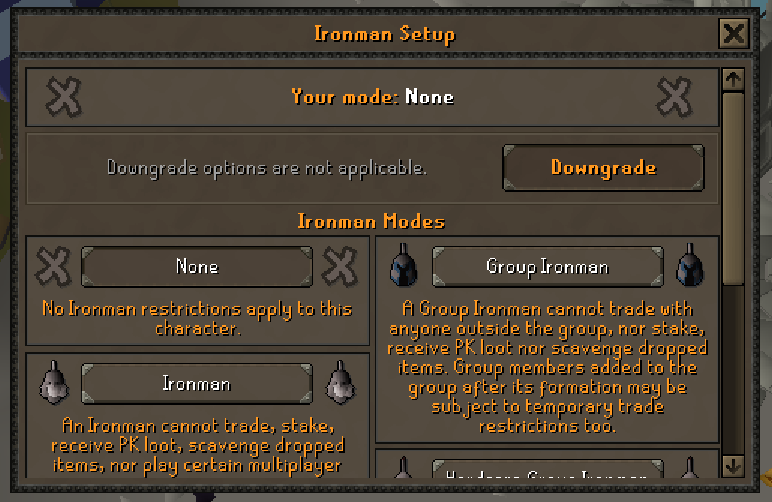
An Ironman mode is a harder way to play, chosen once at the start. Each one removes things a normal character can do:
| Mode | What it changes |
|---|---|
| None | A normal character. You can trade, use every shop and play everything. Choose this if you are unsure. |
| Ironman | Cannot trade with other players, stake, take loot from player kills or pick up items other players dropped, and cannot play certain multiplayer minigames. |
| Hardcore Ironman | The Ironman rules, with one life. Dying outside a safe situation turns the character into a standard Ironman. |
| Ultimate Ironman | The Ironman rules, and the character cannot use banks or protect items on death in dangerous areas. |
| Group Ironman | Can only trade with the players in its own group. |
| Hardcore Group Ironman | Group Ironman rules with a set number of shared lives. When the lives run out everyone in the group becomes a regular Group Ironman. |
| Unranked Group Ironman | Group Ironman rules without a place on the hiscores, and with fewer limits on forming a group. |
Your starter kit
Every new character arrives with these items already in its inventory:
| Item | What it is for |
|---|---|
| Iron scimitar and wooden shield | Your first melee weapon and shield. Click each one to wear it. |
| Shortbow and 100 bronze arrows | For Ranged. Wield the bow and the arrows. |
| Staff of air and 100 mind runes | For Magic. The staff supplies air runes for the Wind Strike spell. |
| Bronze axe | Chopping trees (Woodcutting). |
| Bronze pickaxe | Mining rocks. |
| Tinderbox | Lighting logs (Firemaking). |
| Small fishing net | Catching shrimp (Fishing). |
| 10 lobsters | Food. Click one to eat it and heal. |
| 25,000 coins | Money for the shops. |
Your first ten minutes
You arrive at Vyrnfall's home: the road before the gate of Varrock Palace, lined with crimson and purple banners. The Vyrnfall Guide, in a blue coat, stands two steps away, with a bank chest beside the road.

- Talk to the Vyrnfall Guide. Click them. This also completes the first goal of your starter path and pays 5,000 coins. Their menu offers teleports, the shops, your bank and a free heal.
- Wear your weapon. Click the iron scimitar and the wooden shield in your inventory.
- Go and fight something easy. Choose Teleport somewhere from the guide, pick Lumbridge, and walk north of the castle to the chicken farm. Defeating your first monster pays 10,000 coins.
- Type ::path to see all eight starter goals and what each one pays.
- Type ::tasks to see today's three daily tasks.
- Type ::home whenever you want to come back home, to the palace gate.
To type a command, click nothing: just type it and press Enter. Every command starts with two colons. The full list is in Commands.
Coming back later
- Open the game and press Sign In.
- Type the same username and password and press Sign In again.
- The welcome screen appears. Press Click here to play.

The welcome screen also shows how many unread messages you have and, if you are a member, how many days of membership are left. If the game remembers you from last time, the title screen greets you by name instead: press Enter Vyrnfall to go straight in, or Sign out and switch account to use a different character.
Next guide: Playing the game