Help / Your account
Your account
Player login on this website, your password, your name and keeping the account yours.
Player login
Player login, at the top of every page, shows a character you already have. It uses the same username and password as the game. It cannot create a character; do that in the game.

- The eye button beside the password shows what you typed.
- Five wrong attempts lock sign-in for 15 minutes.
- You stay signed in for 12 hours, then sign in again.
- Signing in here does not log your character into the game, and you can use both at once.
The Character page

| Part | What it shows |
|---|---|
| Name plate | Your name, whether the character is online, your membership days, any rank, and your combat and total level. |
| Coins | Coins in your inventory and bank added together. |
| Vyrnfall points | Points you can spend in the points shop. |
| Total XP | All your XP in every skill. |
| Starter path | Your next goal and its reward, then all eight goals. It disappears once all are done. |
| Daily tasks | Today's three tasks with a progress bar each, and the time until new tasks. |
| Membership | Shown if you are not a member: the price and how many coins you have toward it. |
| Skills | Every skill with its level and a bar toward the next. |
| Account record | When the character was created and last saved. |
The Items page

- Inventory, Worn equipment and Bank are shown as slots, in the same places as in the game.
- Grouped list shows the same items as a plain list with quantities.
- Type in the search box to find an item by name. Click a slot to read its full name and quantity.
- This page is for looking only. Items are moved in the game.
The Shop page
The Shop page sells everything in the game's ::shops, at the same prices, and puts what you buy straight into your character's inventory.

- Log your character in to the game. You can look through the shops without it, but buying needs the character online.
- Type part of an item's name in Search every shop, or choose one shop from the list beside it.
- Set how many you want, up to 5,000 at a time, and press Buy.
- Coins are taken from your inventory first, then from your bank.
- The items go into your inventory, so it needs free space.
- You cannot buy while your character is in a fight, in the Wilderness or in the middle of something else, such as a trade.
- Each item shows which shop sells it and what it is paid with: coins, Vyrnfall points or another currency.
Points exchange
The Points exchange tab cashes in Vyrnfall points: 10,000 coins for each point, 30 days of membership for 500 points, or a name change now for 150 points. Membership and the name change ask you to press the button a second time before they take your points. In the game this is ::exchange.

The Messages page

| Section | What appears there |
|---|---|
| Sent to you by staff | Anything staff sent to you personally, including formal warnings. |
| Account standing | Whether the account is muted or banned, until when, and the reason. Also items waiting for your next login. |
| Server announcements | Notices staff posted for everyone. |
The forum
The Vyrnfall forum is open for anyone to read. To post, press Sign in there and use your game username and password. You post as your character, under the name other players see in the game.
- A post is plain text. Leave an empty line between paragraphs, and start a line with > to quote. Web addresses become links.
- You can edit or remove your own posts.
- Report under a post sends it to staff with your reason. The author does not see who reported it.
- When someone replies to a thread you started, you are told in the game: at once if you are playing, otherwise the next time you log in.
- Only staff start threads in News and Announcements. Everyone can reply there.
- A muted or banned account cannot post.
The rules of the game are the rules of the forum. Staff will never ask for your password, there or in the game.
Changing your password
Use the Account page of Player login.

- Sign in to Player login and open Account.
- Type your current password.
- Type the new one: 6 to 20 characters, the most the game's login screen accepts.
- Press Change password.
The new password works the next time you log in to the game. You can also type ::changepassword newpassword in the game; that way the password must be 4 to 19 characters and it is shown back to you in your chat box, so make sure nobody is watching your screen.
Add an email address
An email address on your account lets you reset a forgotten password yourself. It is used for that, and to tell you when your password or address changes. Nothing else is sent, and other players never see it.
- Sign in to Player login and open Account.
- Under Email address, type your address and your current password, then press Add email address.
- Open the email from Vyrnfall and press Confirm email address. The link works for 24 hours.
The address counts only once you have confirmed it. If the email does not arrive, check your spam folder, then press Send the link again on the Account page. To use a different address, add the new one the same way: the old one stays until the new one is confirmed. You can remove the address there too.
If you forget your password
With a confirmed email address:
- Open Player login and press Forgot your password?
- Type your game username, or your email address, and press Send reset link.
- Open the email from Vyrnfall and press Choose a new password. The link works once, for 60 minutes.
- Type a new password of 6 to 20 characters. It is your game password from then on.
The page always says a link is on its way, whether or not the account has an address, so that nobody can use it to find out who plays. If no email arrives within a few minutes, check your spam folder and that you typed the username or address correctly, then ask for the link once more: email can be delayed. If there is still nothing after that, either the account has no confirmed address or the message is not reaching your mailbox. In both cases staff can set a new password for you, as described below.
Without a confirmed email address only staff can set a new password:
- Contact staff. If you have another character, log in with it and type ::staff to see who is online.
- Be ready to answer questions that show the account is yours, such as when you made it and what it owns.
- Staff set a temporary password. Log in with it and change it straight away.
Staff will never ask for your current password, and nobody needs it to help you.
Changing your name
You have two names. Your username is what you log in with and never changes. Your display name is what other players see, and you can change it.
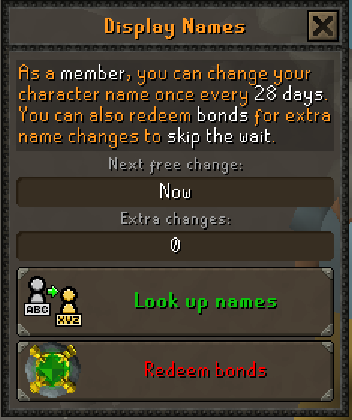
- Open the account tab (the figure icon in the bottom row of the side panel) and press Change Name.
- Press Look up names, type the name you want and press Enter.
- If it is available, press the button to take it and confirm.
- The game logs you out. Log back in with your username; your new name now shows everywhere.
| Rule | Detail |
|---|---|
| Length | Up to 12 characters. |
| Characters | Letters, numbers and spaces. |
| Not allowed | Names containing "mod", and names another player has. |
| How often | Once every 28 days. Members: once every 7 days. |
| Your old name | Kept for you for 35 days, so nobody else can take it straight away. |
::displayname shows your current name and when you can change it again. ::displayname New Name changes it from the chat box.
Keeping your account safe
- Use a password you do not use on any other site.
- Add an email address. Vyrnfall emails you when your password or address changes, so you notice a change you did not make.
- Never tell anyone your password. Staff do not need it and will not ask.
- Only type your password at app.vyrnfall.net. Check the address bar.
- On a shared computer, untick Stay signed in on this device, log out of the game, and press Sign out in Player login.
- Buying or selling accounts, items or coins for real money is against the rules and is how most accounts get stolen.
Next guide: Commands